

- October 1, 2026
- Clinic Director
- Comment: 0
- Blog
Ergonomics and Back Pain Why Your Workspace Might Be Undoing Your Treatment
The difference between recovering from back pain and returning to it is often decided somewhere between nine and five, not in the treatment room.
By Vasily Maslukovs, Doctor of Chiropractic | The Back Pain Centre, South Woodford
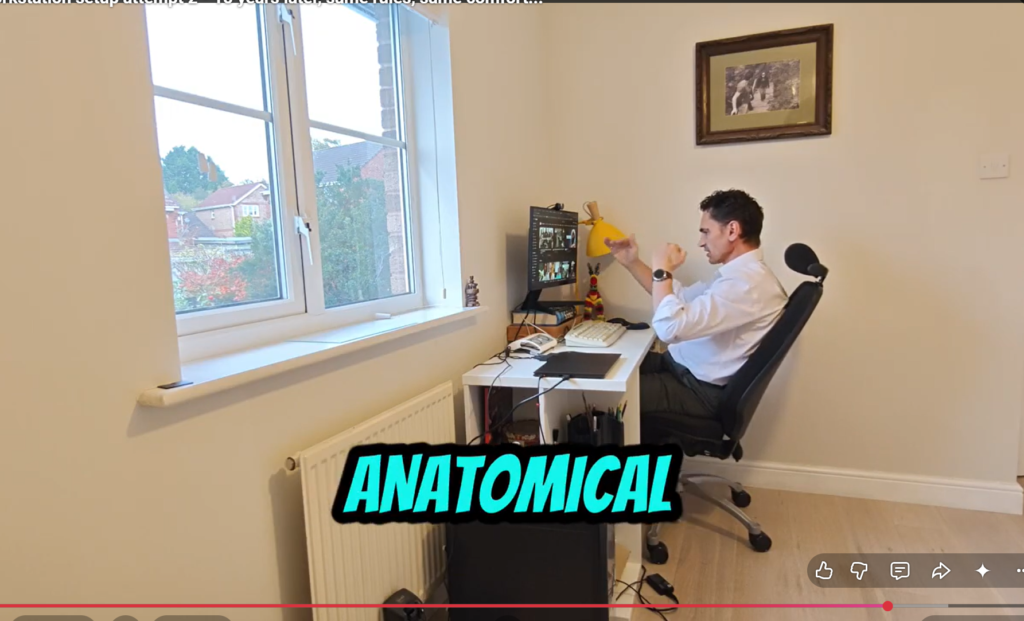
I see this pattern often. A patient works through their treatment plan and starts to feel real improvement. Then, a few weeks after returning to their normal working routine, the same tightness creeps back in. When I ask what has changed, the answer is usually nothing. They have simply returned to the same desk, chair, and screen setup that contributed to the problem in the first place. This is where ergonomics and back pain intersect.
Why ergonomics and back pain are so closely linked
Ergonomics is not about an expensive chair or a trendy standing desk. It is about how well your workstation supports the natural position of your spine over hours of repeated use. A desk set up even slightly wrong will not usually cause pain on day one. It causes pain through accumulation, the same small strain repeated hundreds of times a day, week after week.
The scale of the ergonomics and back pain problem in UK workplaces is not small. According to the Health and Safety Executive, an estimated 40.1 million working days were lost to work-related ill health and workplace injury in 2024/25, with musculoskeletal disorders accounting for 7.1 million of those days. HSE figures also show 511,000 workers suffered from a work-related musculoskeletal disorder in the most recent reporting period, and the wider cost of work-related ill health and injury to the UK economy runs into billions of pounds annually. These are not abstract figures. They represent people whose desk and screen setup were quietly working against their spine every day.
The desk faults I see most often in clinic
A handful of ergonomics and back pain issues come up repeatedly with patients:
Screen height
A laptop or monitor positioned too low forces the neck into constant forward flexion, loading the cervical spine and upper back.
Chair depth and lumbar support
Many chairs are either too deep or lack real lower back support, so the natural curve of the lumbar spine collapses over the day.
Reach distance
A keyboard or mouse positioned too far away encourages rounded shoulders and a forward-leaning upper body.
Laptop-only setups
Working from a laptop without an external monitor or riser usually forces a compromise between screen height and keyboard position.
None of these faults feels dramatic alone, which is exactly why they are so easy to overlook and so damaging over time.
What a properly set up workstation looks like
A well set up desk supports a neutral spine rather than fighting against it. As a general guide, the top of your screen should sit roughly at eye level or higher, your forearms should rest on the table close to horizontal when typing, and your feet should be flat on the floor or a foot stool with your knees at a similar height to your hips. Your chair should support the inward curve of your lower back, not just your upper back. Getting this right is one of the simplest, most direct ways to reduce the strain that connects poor ergonomics and back pain. The arm rests have to be retractable or removable to allow your chair to move close to the table to recline and relax with your lower back supported.
The Health and Safety Executive publishes detailed guidance on setting up display screen equipment, including workstation checklists covering screen position, seating, and lighting, a useful reference for employers and individuals alike.
How forward-thinking employers are tackling the problem
Some employers are moving beyond a one-off equipment purchase and treating workplace ergonomics as an ongoing part of employee health. A study published in the journal Healthcare in 2024 tested this directly, running a programme with 247 office workers across several companies that combined an ergonomics seminar with demonstrations of workstation adjustment and stretching exercises. Employees who received the intervention early showed measurable improvements in physical and mental health, with pain reductions recorded across the neck, shoulders, wrists, upper back, lower back, hips, and knees.
That pattern reflects what I see in clinic. Education and practical adjustment, delivered together, tend to outperform either one alone. A better chair rarely solves the problem if nobody explains how to use it, and advice without the right equipment is just as limited.
Where ergonomics fits into your treatment plan
A corrected desk is not a substitute for proper assessment and treatment, and I would be cautious of anyone who suggests it is. But it is a genuine part of the picture. If we treat the spine in clinic and a patient then spends eight hours a day undoing that work at a poorly set up desk, progress will always be slower than it needs to be. This is why, alongside treatment, we talk to patients about the practical realities of their working day, building on the posture guidance shared in the previous article in this series.
If your work involves long hours at a screen and ongoing back or neck discomfort, it is worth having your workstation properly assessed alongside any treatment you are receiving. You are welcome to get in touch with the clinic or find out more about our chiropractic care and physiotherapy services. Call us on 02089 893 338 or connect with me directly on LinkedIn. We look forward to welcoming you to the clinic soon.
About the author
Vasily Maslukovs has been treating backs and necks since 1994, beginning his clinical career in Latvia before qualifying as a UK registered chiropractor. He has been the owner and clinical director of The Back Pain Centre in South Woodford since 2012. His approach is built on the principle that lasting results require both precise clinical treatment and genuine patient understanding of the habits and environments that support or undermine recovery.
Frequently asked questions
Can bad ergonomics cause back pain even if I exercise regularly?
Yes. Regular exercise supports overall spinal health, but it does not undo hours of sustained poor posture at a desk each day. The two work best together, since exercise builds strength and mobility while good ergonomics helps reduce the repeated strain placed on that same spine during working hours.
What is the single most important thing to fix at a desk?
There is rarely one single fix, since screen height, chair support, and reach distance all interact with each other. If you can only address one thing, correcting screen height to reduce forward neck flexion tends to make the most noticeable difference for most people.
Do standing desks actually help with back pain?
Standing desks can help by encouraging more movement and variation throughout the day, but standing all day with poor posture causes many of the same problems as sitting all day with poor posture. The real benefit comes from alternating between sitting and standing, not from standing alone.
How often should I get up and move during the working day?
As a general guide, aim to change position or take a short movement break roughly every 30 to 45 minutes. Even a brief walk to refill a water bottle or a minute of stretching can reduce the cumulative loading that builds up during long periods at a desk.